Envoke vs. ContactMonkey: Which Email Platform Is Right for Public Health Organizations?

Choosing an email communications platform for a public health organization isn’t the same as choosing one for a marketing team or a corporate HR department. The stakes are different. The audiences are different. And in many cases, the legal and operational obligations are different too.

Two platforms that come up regularly in Canadian public health procurement conversations are Envoke and ContactMonkey. Both are email tools. Both are Canadian companies. But they were built for fundamentally different purposes, and that distinction matters more than almost any feature comparison. This comparison was written by the Envoke team. We’ve done our best to represent both platforms accurately.

This post breaks down where each platform excels, where each falls short, and how to think about the decision based on your organization’s actual mandate.

The Core Difference: Internal vs. Internal and External

Before comparing features, it’s worth understanding what each platform was designed to do.

ContactMonkey is an internal communications platform. It was built to help HR and corporate communications teams reach employees: through newsletters, pulse surveys, and Outlook-native distribution. It does that job well.

Envoke was built for organizations that need to communicate with people both inside and outside their walls: staff, yes, but also community members, stakeholders, partner organizations, and the public.

Where Envoke Has a Structural Advantage

Messaging types aligned with communication needs

Public health organizations don’t send just one kind of email. They operate across different communication contexts, each with its own expectations, consent models, and risk levels.

Envoke is designed around three distinct types of messaging:

  • Internal messaging for staff updates, operational coordination, and day-to-day communications
  • Opt-in messaging for newsletters, campaigns, and subscriber-based outreach
  • Mandatory messaging for critical communications that must reach recipients regardless of subscription status

Mandatory messaging is intended for high-stakes scenarios: such as outbreak alerts, vaccine schedule changes, compliance notices, or emergency directives where delays between sending and receiving create operational or public risk.

This isn’t about bypassing consent. It’s about recognizing that not all communications operate under the same rules, and providing a structured way to handle each appropriately.

Tools like ContactMonkey operate primarily within a subscription-based model designed for internal communications. While they can approximate some of these use cases, they don’t provide a purpose-built framework that distinguishes between internal, opt-in, and mandatory communications at an architectural level.

External communications capability

Public health units routinely need to reach beyond their staff: notifying community partners, distributing public advisories, communicating with registered residents, updating external stakeholders. ContactMonkey requires a separate platform for all of this. Envoke handles internal and external from a single account, under one contract, with one set of analytics.

Sub-accounts by department

Immunization programs, mental health services, and environmental health teams all have different audiences, different send frequencies, and different compliance requirements. Envoke’s sub-account structure gives each department its own isolated account, with its own lists, templates, and permissions, while central administration retains full visibility and override control. ContactMonkey doesn’t offer this. Teams either share a single account, creating governance and deliverability risk, or purchase separate subscriptions.

CAD billing

This one is often underestimated until budget season. ContactMonkey invoices in USD. For Canadian health units operating on fixed multi-year budgets, that means real foreign exchange exposure, your effective software cost changes every time the Canadian dollar moves, without any change to your contract. Envoke bills in CAD. The price you negotiate is the price you pay.

ContactMonkey's Strengths

Its Outlook and Gmail plugin lets teams send directly from existing inboxes without switching tools, a meaningful benefit for organizations where staff live in Microsoft environments and adoption friction is a real concern. Its built-in employee surveys, eNPS scoring, and pulse feedback tools are purpose-built for internal engagement measurement. And its HRIS sync keeps distribution lists current automatically, which matters for organizations with high staff turnover.

If your communications mandate is entirely internal, your team is Outlook-dependent, and employee engagement surveys are a primary use case, ContactMonkey is a capable, well-designed tool.

Feature Envoke ContactMonkey
Mandatory / non-unsubscribable messaging
Public-facing external communications
Internal staff communications
Sub-accounts by department
CAD billing USD
Bilingual EN/FR platform
Outlook / Gmail inbox plugin
Employee surveys & polls Limited
HRIS sync

The Bottom Line

The decision between Envoke and ContactMonkey is ultimately a question of scope. If your mandate is internal-only and your team is deeply embedded in Microsoft’s ecosystem, ContactMonkey is a legitimate choice.

If your mandate includes any combination of external communications, mandatory messaging, multi-department governance, CAD billing, or bilingual features, that’s Envoke’s territory. For most Canadian public health organizations, that’s not a list of edge cases. It’s a list of table stakes.

If you are a communicator, not a marketer, you might find yourself looking for a Constant Contact alternative in Canada to replace your email marketing platform. Why? While Constant Contact is a really great piece of software, it’s designed for marketers. They have social media marketing, SMS marketing campaigns, e-commerce integrations, lead nurture automation, abandoned cart notification emails, and  Google Ads and SEO integration.

But what if your goal is not to generate commercial revenue? What software can you use if you’re looking for a Constant Contact alternative built with the needs of communicators in mind?

In this article, we explore how Envoke, a Canadian Constant Contact alternative designed for communications professionals, compares to Constant Contact.

Try Envoke today: Create a free trial account.

Email for communication, not lead generation.

There are 3 key differences:

  1. Constant Contact is for marketers Envoke is purpose-built for communications professionals.
  2. Data storage and CASL compliance. Envoke stores all customer data on servers in Canada and it’s fully CASL compliant.
  3. Subscription management. Constant Contact is list-based and doesn’t allow sending emails without an unsubscribe option. Envoke includes more sophisticated list segmentation tools and you can use it to send mandatory or regulatory content that recipients cannot unsubscribe from.

1. Constant Contact is for Marketers: Envoke is for Communicators

Constant Contact’s products focus on marketing, e-commerce, and lead generation for small business (SMB) marketers, and marketers with larger teams. Their purpose is commercial revenue generation. All features are designed with this in mind: with every setting the emphasis is to generate leads and sell to those leads using a combination of digital marketing automation tools. The contact lists of Constant Contact users are comprised of prospects, leads, and customers. The result is that Constant Contact can work well for marketers because the features are well-designed for this purpose and intuitive to use.

However, the mandate of communication professionals is not commercial revenue generation but stakeholder engagement via content that recipients want to receive and content they need to receive. The contact lists of communications professionals are comprised of stakeholders, members, staff, and registrants, and the objective is to inform, educate and foster long term relationships. Not to sell things. 

Constant Contact alternative in Canada is great for communicators.

2. Data Storage in Canada and CASL Compliance

As a Constant Contact alternative in Canada, Envoke stores all customer data on servers in Canada. This means your organization’s Canadian data storage requirement is satisfied when you have an account with Envoke.

Even if it’s not a hard requirement for your organization to keep data in Canada, it’s worth remembering that the US Patriot Act permits US law enforcement officials to seek a court order allowing them to access the personal records of any person without that person’s knowledge.

As for CASL compliance, Envoke is fully CASL compliant out of the box, supporting common use cases and even edge cases.

3. Subscription Management and Mandatory Content

Constant Contact and Envoke have similar list management tools to group contacts in order to send relevant emails. Both platforms have lists (subscriptions), tags, and segments (custom lists based on user-defined conditions) and both allow dynamic content in emails to show or hide blocks of content based on the recipient’s interest. In short, both platforms offer very flexible, powerful tools for managing contact lists.

When it comes to sending emails, Constant Contact only allows sending to lists (subscriptions) while Envoke allows sending an email to contacts that match certain tags or custom segments.

Envoke adds even more value with its customizable Unsubscribe Page and Mandatory Messages feature. Mandatory Messaging facilitates sending important messages in bulk to contacts regardless of their subscription status when regulation or contractual obligation requires you to do so. Let’s explore these two options a bit more closely. 

The Unsubscribe Page

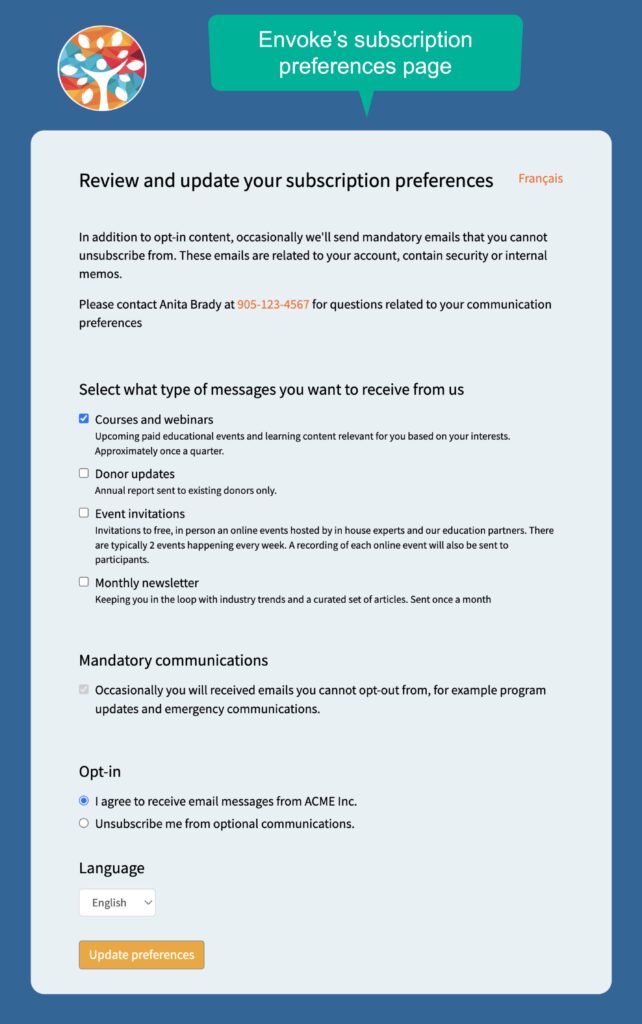
Envoke’s customizable Unsubscribe Page lets you empower your contacts to fully understand what type of messages they receive from you and why.  Think of it as a relationship-building tool, not just a place to manage unsubscribed contacts.  Communicators who embrace this concept will quickly see that Envoke is an excellent Constant Contact alternative for this reason alone. The page can be fully branded with your fonts, colours, domain name, custom text, and sections that can be added or removed. 
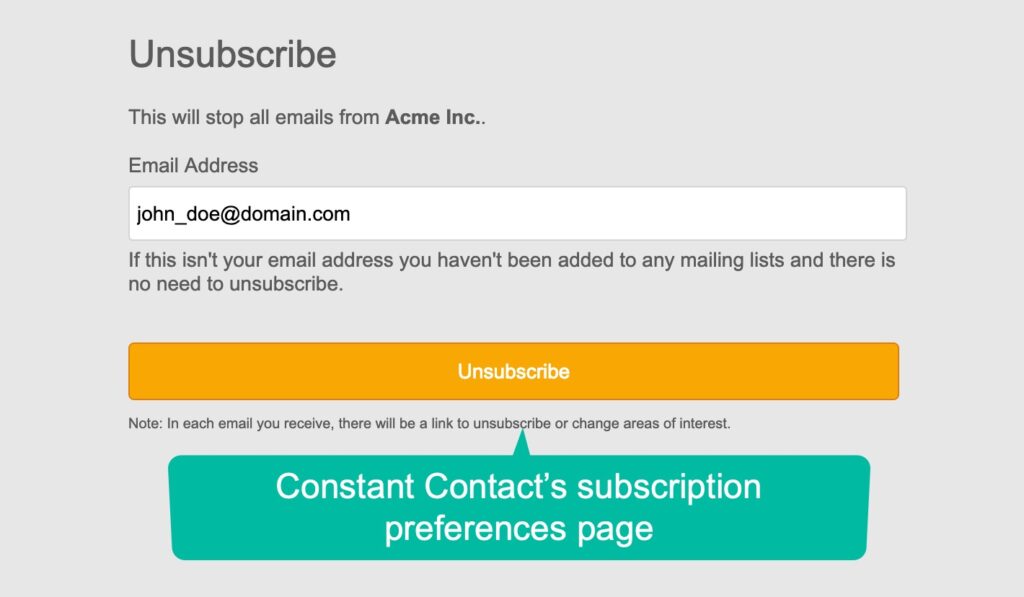
Constant Contact's Unsubscribe page

Envoke's Unsubscribe Page

Mandatory Messages that Contacts Must Receive

Reach even unsubscribed contacts with Envoke’s mandatory messages feature. Unique to Envoke, this feature lets you fulfill your legal or contractual obligation to deliver emails that your contacts can’t unsubscribe from. It is not offered by Constant Contact, Mailchimp, or any other email marketing platform, and is a vital tool for organisations with contractual or legal obligations to deliver messages from which stakeholders cannot unsubscribe.

Mandatory messaging saves considerable time and is much less error-prone than the manual work-arounds that many communicators are forced to invent in order to ensure mandatory messages are sent to those who must receive them. 

Envoke Has All The Features You Need

Using a Constant Contact alternative in Canada doesn’t mean you’re compromising on core features. Every Envoke account includes all the essential features you are accustomed to:
Drag-and-drop email editing

  • Unlimited forms,
  • Custom fields
  • Great inbox delivery
  • In-depth reporting
  • Secure infrastructure 

  • Cost Comparison

    Because functionality varies it’s not possible to provide a direct comparison between Constant Contact and Envoke, but the same ie true when comparing any software. Still, the difference in pricing is significant, even when we account for the variouation in features offered in each billing plan. Take a look at Envoke’s detailed feature list and Constant Contact’s feature page, to see how features and price points stack up, specifically. This graph provides a good snapshot of the price comparison. 
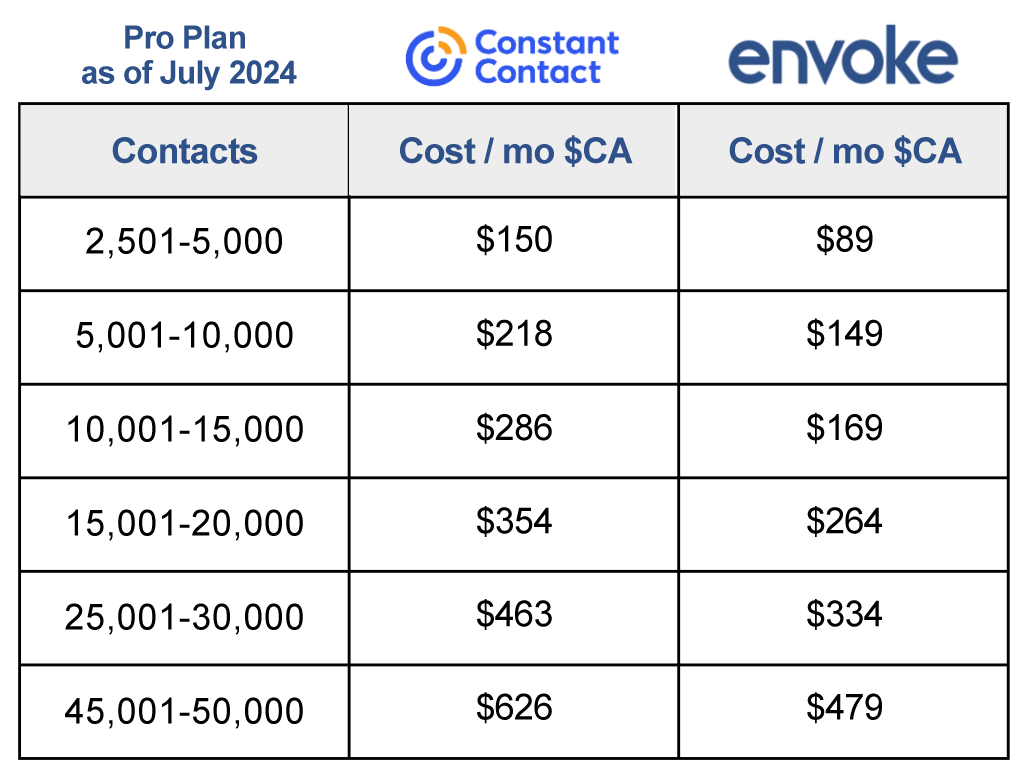
    Envoke vs Constant Contact Pro Plan pricing chart.

    Who Uses Envoke?

    Organizations of all sizes use Envoke as a Constant Contact alternative to engage stakeholders, including big and small associations, post-secondary institutions, muncipalities and government agencies. Whether you have one user, or one hundred,  Envoke’s flexible pricing structure starts low and scales as your organization and contact list grows. (And unlike some of our competitors, you won’t pay to send email to unsubsribed contact with Envoke.) Envoke creates beautiful emails, enewsletters and e-blasts to inform and educate your takeholders, every time.  

    As for customer support, you get to interact with a human – and even speak with management if needed. From day one, our goal is to help customers be successful with their email communications and offer truly helpful support. Read reviews on Capterra.

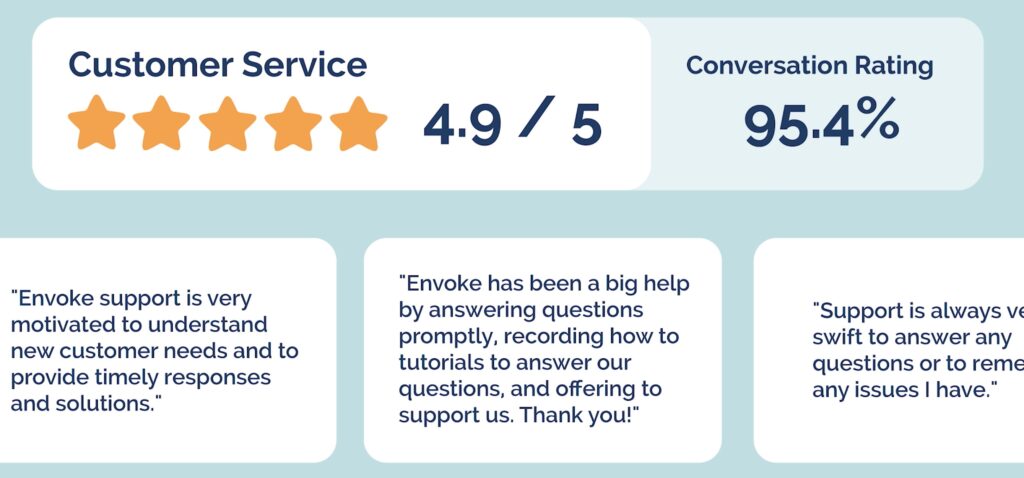
    Sample customers of Envoke, a Constant Contact Alternative in Canada.

    Envoke's Capterra rating

    Interested in a Canadian Alternative to Constant Contact?

    You can book a live demo here to discuss your requirements and confirm or rule out a fit – or start a free trial to test drive functionality. 

    About the Author

    Try Envoke today: Create a free trial account.

    Email for communication, not lead generation.

    Share this Article

    LinkedIn
    Threads

    Start a 30 day trial

    Start a fully loaded trial account

    30 days free access:

    Let’s discuss your requirements to establish or rule out a fit.

    Trial accounts include full support and all functionality.

    Let’s discuss your requirements to establish or rule out a fit.

    Trial accounts include full support and all functionality.

    Join our list to receive our monthly “practical tips and best practices” emails.
    Unsubscribe any time.

    View our newsletter archives to get a glimpse of the kind of messages you’ll be receiving.

    Start a 30 day trial

    Start a fully loaded trial account

    30 days free access:

    Let’s discuss your requirements to establish or rule out a fit.

    Trial accounts include full support and all functionality.

    Start a 30 day trial

    Start a fully loaded trial account

    30 days free access: