
Emails are read once, then buried. Public archives change that.
Once an email is sent, it starts disappearing. It gets pushed down by the next message, buried in inboxes, and forgotten, even when the information inside is still relevant and worth revisiting.
For organizations that rely on email to keep members, students, staff, donors, or community stakeholders informed, that’s a real problem.
Envoke’s public archives feature gives your communications a longer shelf life. Every email you send can be preserved in a clean, browsable archive that’s accessible to anyone, not just the people it was originally sent to.
What Is a Public Archives Page?
A public archives page is a hosted, chronologically organized listing of your email communications. Each message is listed by subject line and links to a full browser-friendly version. It lives outside the inbox and outside any login wall, making it easy for anyone to find and read your past communications.
Think of it as a living record of everything your organization has communicated — meeting notices, policy updates, event announcements, newsletters, program changes — organized and accessible in one place, without anyone having to dig through their inbox to find what they need.
Why It Matters for Your Organization
Stakeholders don’t always read every email when it arrives. Members miss a newsletter during a busy week. New students join mid-semester and want to get up to speed. A prospective donor wants to understand your organization before they engage. An alumni relations team wants to point people to a year’s worth of updates without manually forwarding messages.
A public archives page solves all of this without extra work on your end.
It also supports transparency. For post-secondary institutions, associations, municipalities, regulators, and public-facing organizations, having an accessible record of past communications signals accountability and keeps your audience in the loop, even after the fact.
Who Benefits Most
Public archives are particularly valuable for organizations that communicate on behalf of a larger community, where staying informed isn’t optional, it’s expected.
Post-secondary institutions can use an archives page so students, faculty, staff, and alumni always have access to campus updates, policy changes, and event announcements, without flooding inboxes with re-sends or relying on people to dig up old messages.
Associations can give members a reliable place to review past communications, governance updates, and member benefits information, especially useful for members who join throughout the year and need context on what’s already been shared.
Municipalities and public sector organizations benefit from the transparency angle. An accessible record of public communications supports accountability, helps residents stay informed, and reduces the volume of individual inquiries your communications team has to handle.
Regulators and compliance-driven organizations can point stakeholders to a clear, time-stamped history of updates and notices, useful when there are questions about what was communicated and when.
Charities and non-profits can use their archives as a low-effort way to show donors and prospective supporters the scope and consistency of their work, without building out a separate updates page on their website.
How It Works in Envoke
When you’re composing a message, simply check “Include in public archives” before sending. Envoke handles the rest, generating a browser-friendly version and adding it to your archive automatically.
A few things worth knowing:
- It’s customizable. You can tailor the look and feel of your archives page to match your brand, your emails, and your website, keeping everything consistent for your audience.
- It stays editable. Unlike standard sent emails, archived messages can be updated after the fact if information changes or a correction is needed.
- It’s RSS-compatible. Reader apps can subscribe via RSS feed, giving technically inclined stakeholders another way to stay current.
- It’s easy to share. Link to it from your website, social media profiles, email signature, or signup forms so people can find it when they need it.You can see an example in [Envoke’s own public archives page], which we use to share product updates and key communications with our customers.
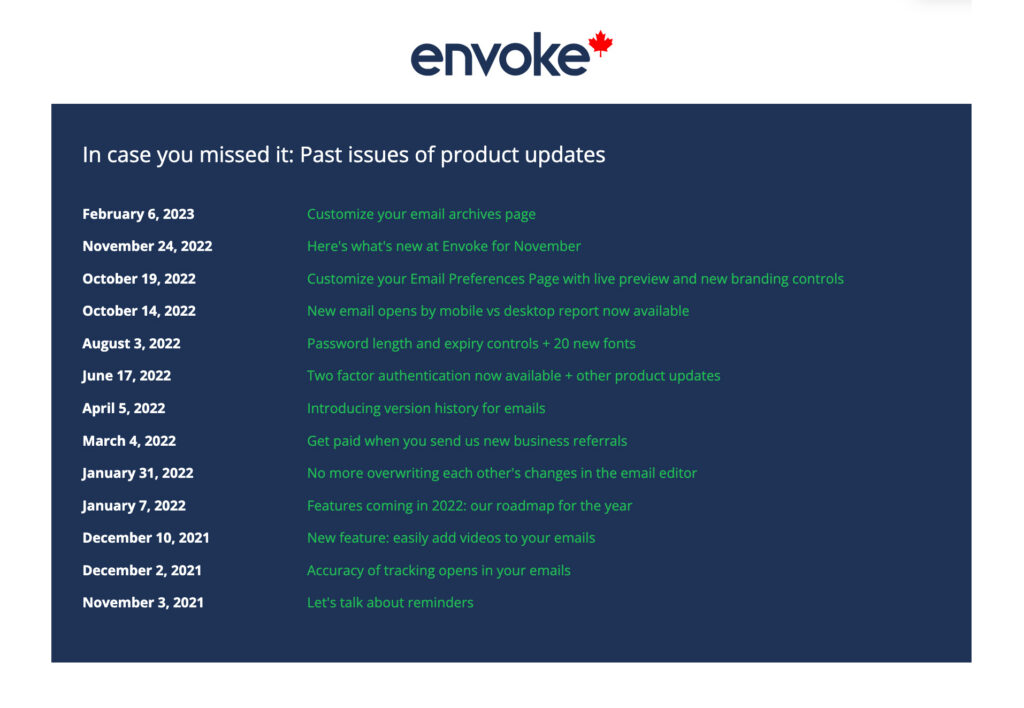
You can see an example in Envoke’s own public archives page, which we use to share product updates and key communications with our customers.
Getting the Most Out of Your Archives Page
Like any communication tool, an archives page works best when it’s part of your broader strategy rather than an afterthought. A few practical ways to put it to work:
Link to it from your email footer so every message you send points readers to the full history. Add it to your website’s navigation or resources section so new visitors can orient themselves quickly. Reference it in your onboarding materials for new members, students, or subscribers so they know where to go to catch up. Promote it on social media when you send something significant, giving people who aren’t on your list a reason to subscribe.
The more visible your archives page is, the more value it creates for your audience and for your organization.
How Envoke Supports Communicators
The archives page reflects something we care about at Envoke: your communications should work harder and last longer than a single send.
It’s a feature built specifically for organizations that communicate with purpose, not for marketers chasing clicks, but for communicators who need their information to be findable, accessible, and preserved.