



Many Canadian organizations are using an email platform that no longer fits their needs. Support is slow, emails are missing from inboxes, the editor is unreliable, or the overhead of managing a tool built for marketing has become impossible to justify.
This guide shares a practical framework for shortlisting and evaluating email platforms, based on what we have heard from hundreds of organizations across our sales conversations and demos.
In this post
- Build your requirements list before you look at platforms
- Table stakes: what most platforms get right
- What criteria actually separates email platforms at the shortlist stage?
- How one Canadian team went from 13 platforms to a shortlist of 4
- What to verify about Canadian data storage and security
- What is mandatory messaging, and why can most platforms not do it?
- Questions to ask in every demo
- What a real internal evaluation looks like
1. Build your requirements list before you look at platforms
Starting with a platform comparison instead of a requirements list is the most common mistake in a software evaluation, and it costs teams weeks of unnecessary demos. Before you look at a single pricing page, write down what your organization actually needs the tool to do. It is also worth considering what your procurement team will need to see, and building those criteria in from the start.
Based on what we hear consistently from organizations evaluating Envoke, here are the twelve requirements that come up most often. The first six are table stakes, most platforms meet them. Requirements seven through twelve are where evaluations actually break down, and where you should spend most of your time.
- Referenceable customers and case studies from similar organizations. Look for customers in your sector, not just logos. A post-secondary institution and a retail brand have very different communication needs.
- Easy to use, with minimal training required for new staff. If the platform requires significant onboarding every time someone new joins your team, that overhead compounds over time.
- Emails that are accessible, on brand, and look professional. Templates should support your brand standards, and emails should meet accessibility requirements out of the box.
- Flexible subscription management that gives contacts meaningful choices. Contacts should be able to manage their own preferences without having to unsubscribe from everything at once.
- Automated list sync with CRM or HR systems. Manual list management creates errors and wastes time. Look for a platform that stays in sync with your source of truth.
- Secure infrastructure that your IT team and compliance officer both approve. Certifications, audit reports, and data handling practices should be verifiable, not self-certified.
- A clutter-free interface that does not include features your team will never use. Features your team does not need are not neutral. They slow onboarding, create confusion, and make routine tasks harder.
- Affordable and predictable pricing with no surprise overages. Some platforms charge by sends rather than contacts, or increase pricing as your list grows without warning.
- Data stored in Canada. For public sector organizations, health agencies, and associations, this is often a legal requirement under PIPEDA, FOIP, or FIPPA, not a preference.
- The ability to send important communications to contacts even if they have unsubscribed from optional emails. This is mandatory messaging, and most platforms cannot do it. It is covered in full in section 6.
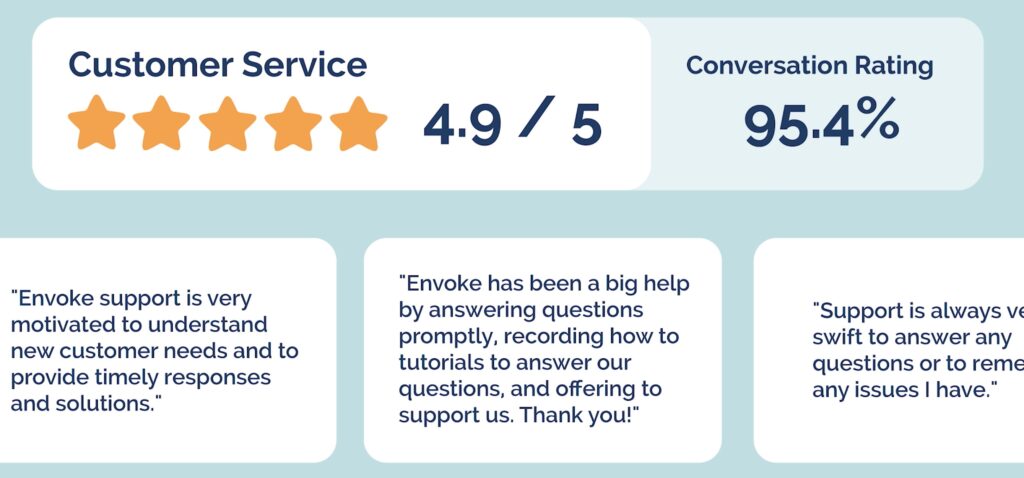
- Fast, human support with reasonable response times. A platform with real people available by phone or video call is worth paying for if you cannot afford a failed send.
- Bonus: accessible leadership who listen to product feedback and are willing to discuss the roadmap. For smaller organizations especially, this kind of relationship with a vendor matters when something goes wrong.
Run this list past your key stakeholders before you start evaluating. Sharing it with IT, finance, and the communications team members who will use the platform daily will surface disagreements early, before you have invested time in demos.
2. Table stakes: what most platforms get right
Most established email platforms meet requirements one through six, and you should not spend significant evaluation time on these criteria alone. Drag-and-drop editors, mobile-responsive templates, DKIM authentication for deliverability, reporting dashboards, and common CRM integrations are broadly available across the market.
CASL compliance is also broadly supported. Platforms including Envoke, Cyberimpact, Constant Contact, and Mailchimp all handle consent tracking and unsubscribe management in ways that support CASL compliance. If a vendor cannot demonstrate this clearly, remove them from your list immediately.
The distinction that matters is not whether a platform handles these basics. It is whether the platform was built for your kind of organization or adapted to fit it. As one Envoke customer put it: “Mailchimp does everything OK. Envoke does email really well.”
3. What criteria actually separates email platforms at the shortlist stage?
Requirements 7 through 12 are where most shortlists collapse. Platforms that perform well on the basics often fall short once you get into pricing structure, data residency, interface complexity, and support quality. These are the criteria worth spending the most time on.
Clutter-free interface
Many platforms try to serve every possible user, from e-commerce brands running abandoned cart sequences to enterprise sales teams managing multi-branch automations. For communicators whose job is to build, send, and report, that added complexity creates friction. Features you will never use are not neutral. They slow onboarding, confuse new staff, and make routine tasks harder than they need to be.
Predictable pricing
Email platform pricing varies widely and is not always straightforward. Some platforms charge by sends rather than contacts. Others charge more as your list grows, with no warning until the invoice arrives. Look for a platform that prices on contacts, bills in Canadian dollars, and gives you a clear picture of what you will pay at your current list size and at double that size.
Canadian data storage
For public sector organizations, post-secondary institutions, health agencies, and associations, this is not a preference. It is often a legal requirement. PIPEDA, FOIP, FIPPA, and other provincial privacy laws create clear obligations around where personal data is stored and processed. Verify that any platform you evaluate stores data on servers physically located in Canada, and ask whether that includes all backups and logs, not just the primary database.
Learn more about Envoke’s Canadian data storage here.
Mandatory messaging
This is the requirement most platforms simply cannot meet, and it is discussed in detail in section 6 below.
Support quality
Support quality is difficult to evaluate from a pricing page. Ask specifically about response times for urgent issues, whether support is available by phone or video call, and whether onboarding is included or billed separately. A platform that costs slightly more but has real humans answering the phone is usually worth it for organizations that cannot afford a failed send.
4. How one Canadian team went from 13 platforms to a shortlist of 4
Applying a requirements list before running a single demo can cut a long list of platforms to a manageable shortlist in an afternoon. One of our customers shared their evaluation process with us, and it is a useful illustration of how quickly that filter works.
They started with 13 platforms. Their first filter was simple: does this platform include features we will never use, such as e-commerce integration, website builders, complex sales automation with multiple branches, cold email prospecting, social media lead generation, or customer journey mapping?
Mailchimp, Constant Contact, ActiveCampaign, Campaign Monitor, and Brevo were all ruled out at this stage. They are primarily marketing tools, and the team’s needs were communication-first. Campaigner was removed after a review of third-party ratings and user feedback.
That left a shortlist of two: Envoke and Cyberimpact. The final two were re-entered because of specific features under review, but the team had cut the list from 13 to 4 without a single demo.
Envoke came out on top for four reasons: support available via scheduled Zoom calls, the option to send mandatory emails, straightforward pricing, and a security scorecard stronger than that of the other platforms evaluated.
5. What to verify about Canadian data storage and security
Canadian data storage is a requirement for many organizations, but asking “do you store data in Canada?” is not enough. The more important question is whether the vendor owns the infrastructure or rents it from a third-party cloud provider such as AWS or Google Cloud.
Some platforms route Canadian customer data through Canadian AWS regions, which means the data is geographically in Canada but the infrastructure is owned and operated by a US company. For organizations with strict data sovereignty requirements, that distinction matters and is worth verifying explicitly before you sign.
You can also use SecurityScorecard to look up any vendor’s publicly visible security posture, covering DNS health, patching cadence, and data exposure signals. It takes five minutes and often surfaces issues before you invest time in a demo.
Envoke has owned and operated its own servers in Toronto and Montreal since 2007. Data never leaves Canada and never touches a third-party cloud.
6. What is mandatory messaging, and why can most platforms not do it?
Mandatory messaging is the ability to send emails to contacts who are legally or contractually required to receive them, even if those contacts have previously unsubscribed. It is not available on Mailchimp, Constant Contact, Cyberimpact or any other mainstream email marketing platform.
Most platforms are built on the assumption that every contact is a potential customer who can always opt out. That model does not reflect how public sector communicators work. A university must notify enrolled students of a registration hold regardless of their email preferences. A regulatory body must reach active licensees with a compliance notice whether or not they unsubscribed from the last newsletter. A municipality must deliver a bylaw change notice to affected residents regardless of their subscription status.
The reason most platforms cannot offer mandatory messaging is that they were never built for this use case. They are designed to help companies acquire customers and drive conversions, so the unsubscribe logic baked into their architecture assumes every contact can always opt out. That assumption is incompatible with legal and contractual communication obligations.
Without mandatory messaging, organizations are forced into manual workarounds: exporting lists, sending through Outlook, maintaining separate distribution groups outside the platform. It defeats the purpose of using an email platform entirely.
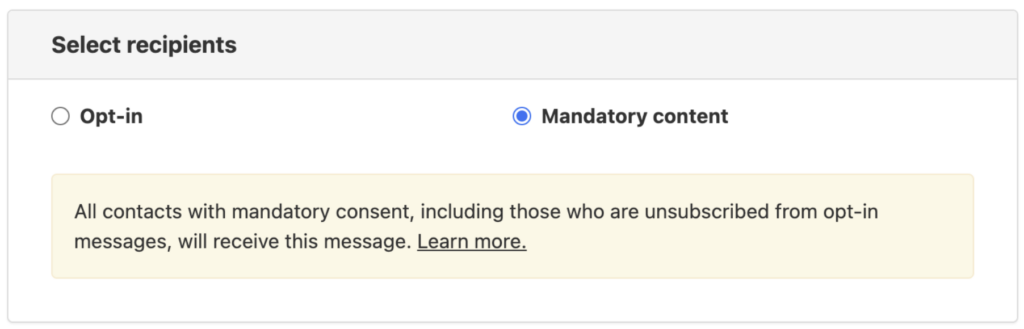
In Envoke, Mandatory Messaging is a toggle you turn on when composing a message. You provide the contractual or regulatory reason for the send, along with a link to a verifying document. That reason and link appear in the footer of every mandatory email, so recipients understand why they are receiving it. Contacts can submit a removal request, which an admin reviews individually, but they cannot self-serve unsubscribe.
"There are certain communications our employees must receive (Ex. benefits enrollment, compliance training), that simply can't be optional. With Envoke's mandatory messaging, we can send those communications knowing employees cannot opt out. That's been a fundamental requirement for us that we couldn't solve before."
Associate Vice President / Director of Public Affairs
University of Alaska
The University of Alaska system office manages communications across three separately accredited institutions with approximately 7,000 employees. They evaluated Workshop and ContactMonkey before choosing Envoke, with mandatory delivery being the single most critical feature in their decision.
7. Questions to ask in every demo
A demo is your opportunity to surface the things a pricing page will not tell you. Here are the questions worth asking every platform you evaluate.
On data and compliance: Where exactly is our data stored? Is it on your own infrastructure or a third-party cloud? What certifications do you hold, and can you share the most recent audit report?
On mandatory messaging: Can contacts who have previously unsubscribed still receive emails we are legally required to send? How is that handled, and how do we document compliance?
On support: What is your response time for urgent issues? Can we reach someone by phone or video call, or is support limited to email and chat? Is onboarding included, or billed separately?
On pricing: How is pricing calculated? Does it change as our contact list grows? Are there overage charges? Do you bill in Canadian dollars?
On the interface: Can we see a live send workflow from draft to delivery? What features would we have access to that our team would never use?
The answers to these questions will tell you more about fit than a feature comparison ever will.
8. What a real internal evaluation looks like
Getting internal buy-in for a platform switch often requires more than a personal recommendation. IT needs to approve infrastructure and security. Finance needs to approve the cost. Leadership needs to see that the evaluation was thorough and the decision is defensible.
One communications team we work with built an internal presentation to take their evaluation to leadership. It followed a simple arc: here is what our current platform cannot do, here is where we want to go, here is what we looked at, here is how we compared them, and here is our recommendation. They used a feature comparison table across eight platforms to show the methodology and ranked their top four on the criteria that mattered most to their organization.
That kind of documentation is worth building even if you are the decision-maker. It creates a clear record of why you chose what you chose, and it protects you if the decision is ever questioned. It also forces you to articulate your requirements clearly, which usually surfaces one or two criteria you had not thought to include.
If you are preparing a similar internal evaluation, download our vendor comparison template that acts as a framework you can adapt for your own shortlist.
Frequently asked questions
Most established platforms handle the basics of CASL compliance, including consent tracking, unsubscribe management, and suppression lists. However, CASL compliance is not the same as full support for all the communication types your organization sends. Platforms built for commercial email marketing may not handle non-commercial or mandatory communications correctly by default.
Some platforms store data in Canadian AWS or Google Cloud regions, which means the data is geographically located in Canada but processed on infrastructure owned by a US company. For organizations with strict data sovereignty requirements, vendor-owned Canadian infrastructure provides stronger guarantees. Always ask whether the vendor owns the servers or rents them from a third-party cloud provider.
Ask directly during the demo about response times for urgent issues, whether support is available by phone or video call, and whether onboarding is included. You can also check G2, Capterra, and third-party review sites for patterns in support complaints. A platform with consistently poor support reviews is unlikely to improve after you sign.
This is the use case that mandatory messaging is designed to solve. If your platform does not support mandatory messaging natively, you will need to manage these contacts through a separate workflow, typically an Outlook distribution list or a manual export process. This creates compliance risk and administrative overhead. Evaluate whether your platform of choice can handle this before you commit.
No. Envoke’s contact-based pricing means you pay for the contacts relevant to your current use case, not for a full enterprise seat. The University of Alaska system office launched with a focused campaign of approximately 2,300 contacts before expanding, which made internal budget approval straightforward. Envoke works for teams at any size as long as their primary need is reliable, compliant communication rather than marketing automation.
Related Articles:
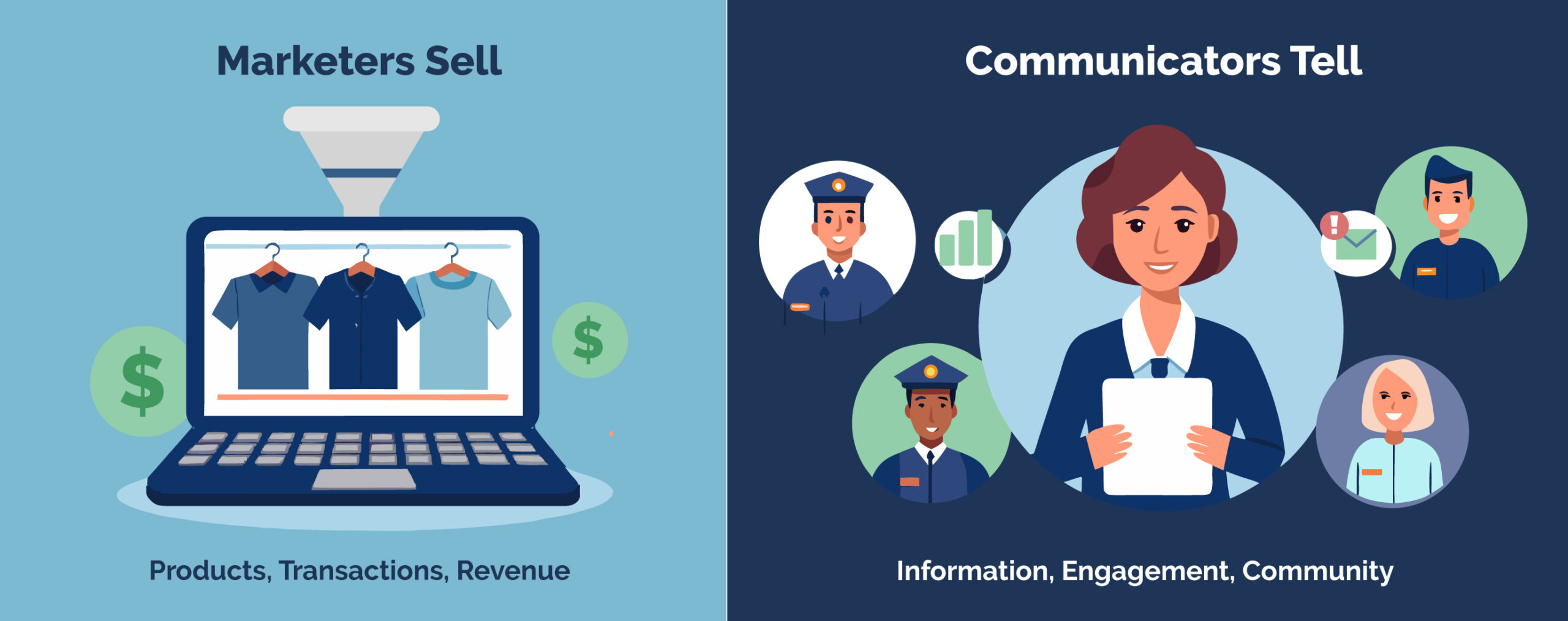
If you’ve ever felt like you’re fighting against your email platform instead of working with it, you’re not alone. Communications professionals across Canada are discovering a fundamental mismatch: they’re using marketing software designed to drive sales funnels when their actual job is stakeholder engagement.
Constant Contact is excellent at what it does—helping businesses convert leads into customers through automated marketing campaigns, e-commerce integrations, and sales-focused workflows. But what happens when your goal isn’t to sell products? What if you need to inform members, engage stakeholders, and deliver mandatory regulatory updates?
That’s where Envoke comes in. A Canadian email platform purpose-built for communications professionals who need to inform and engage, not market and convert.
The Marketing vs. Communications Divide
The difference between marketing and communications software isn’t just semantic—it shapes every feature, workflow, and capability.
Marketing platforms like Constant Contact are designed around the conversion funnel. Every feature exists to move prospects closer to a purchase: abandoned cart emails, lead scoring, product recommendations, and sales automation. The assumption is that every recipient is a potential customer, and every message is an opportunity to drive revenue.
Communications platforms like Envoke are designed around stakeholder engagement. The goal is to keep people informed, educated, and connected to your organization—whether they’re members, employees, constituents, or registrants. Success isn’t measured by conversion rates; it’s measured by how effectively you maintain relationships and fulfill your communication obligations.
This fundamental difference becomes painfully obvious when you try to accomplish basic communications tasks with marketing software.
Where Constant Contact Falls Short for Communicators (And How Envoke Helps)
1. US Data Storage Creates Compliance Challenges for Canadian Organizations
The Problem with Constant Contact: Constant Contact stores customer data on US servers, meaning your information falls under US laws like the Patriot Act, which allows access without notice. For Canadian public sector organizations, municipalities, healthcare institutions, and associations, this raises serious privacy and data sovereignty concerns—your data is no longer protected solely by Canadian law.
Constant Contact also bills in US dollars, adding exchange rate complications and unpredictable costs. Many users cite issues with opaque billing, difficult cancellations, and extra charges that make pricing unclear.
How Envoke Solves This: Envoke keeps all customer data on Canadian servers, ensuring your information stays under Canadian jurisdiction and protected by Canadian privacy standards. Plus, you’ll enjoy transparent pricing in Canadian dollars—no currency conversions, hidden fees, or billing headaches.
2. Marketing-First Design Gets in the Way of Communication Work
The Problem with Constant Contact: Constant Contact is designed with e-commerce and marketing campaigns as the priority. The platform is packed with features for online stores, coupon codes, product catalogs, and sales-focused automation that communications professionals simply don’t need. For communicators focused on stakeholder engagement and organizational reputation, these tools create unnecessary clutter and complexity.
How Envoke Solves This: Envoke is built specifically for communications teams, not marketers. The interface is clean, user-friendly, and free of e-commerce bloat. You won’t waste time navigating around shopping cart integrations or promotional campaign tools. Instead, you get exactly what you need: straightforward tools to manage multiple contact lists, maintain compliance, and send both optional and required messages. Communication stays what it should be: professional, clear, and effective.
3. No Way to Send Required Communications to Unsubscribed Contacts
The Problem with Constant Contact: Here’s a critical limitation: Constant Contact cannot deliver essential communications to contacts who’ve opted out of optional content. If someone unsubscribes from your newsletter, they become completely unreachable through the platform—even for legally required notifications.
Consider this scenario: Your organization’s legal department issues a policy update affecting all staff members. Half your employees opted out of the weekly newsletter long ago because they preferred other communication channels. With Constant Contact, those employees are invisible to your email system. You’re forced into manual workarounds—exporting spreadsheets, sending one-off messages outside the platform, and hoping nobody gets missed.
For organizations with regulatory, contractual, or legal obligations, this isn’t just inconvenient—it’s a compliance risk.
How Envoke Solves This: Envoke’s three-tiered email system gives you the flexibility to communicate appropriately in every situation:
Mandatory Messages reach all contacts who need critical information, regardless of their subscription preferences. The system distinguishes between optional content (which respects subscription choices) and mandatory content (which reaches everyone required). Each mandatory message is tracked separately for compliance documentation and clearly labeled so recipients understand why they’re receiving it.
Real-world applications:
- Universities reaching all students with campus safety notifications
- Municipalities notifying all residents about service interruptions or emergencies
- Professional associations communicating required regulatory updates to members
- Healthcare organizations delivering mandatory health advisories
Internal emails let you strengthen stakeholder relationships with professional, branded communications. Monitor performance with comprehensive analytics and ensure optimal inbox placement with ongoing deliverability support.
Opt-in emails use double opt-in verification to confirm new email addresses from form submissions. Only validated contacts receive emails, keeping your database clean, reducing bounces, and preventing unauthorized subscriptions. Unverified contacts don’t count toward billing, and verification emails can be resent individually when needed.
This framework has saved Canadian organizations countless hours of manual work while eliminating the compliance risk of missing stakeholders with time-critical required communications.
4. Fragmented Systems Across Departments Create Operational Chaos
The Problem: Many organizations struggle with different departments using different email platforms—in post secondary for example, the alumni office might use Constant Contact, student affairs uses Mailchimp, admissions uses another tool, and individual faculties each have their own solutions. This fragmentation creates billing complexity across multiple vendors, redundant contact management, inconsistent branding, security headaches for IT teams conducting multiple reviews, and makes coordinating organization-wide messaging nearly impossible.
How Envoke Solves This: Envoke offers a unified, Canadian solution that brings all your departments together. Through sub-accounts, you can consolidate your organization’s email communications into one platform while still enabling departments to work autonomously with central administrative oversight.
Administrators can determine which users access specific contact lists, distribute templates for brand consistency, and configure permissions across departments. Each department can communicate independently with its audiences, maintaining its own lists and data, while ensuring targeted content delivery and minimizing mistakes.
Example: For a university, this means alumni relations, student recruitment, individual faculties, and other units each have their own sub-account—but your IT team conducts just one security review and risk assessment. One Canadian vendor, one compliance framework, one unified system.
Sub-accounts reduce software costs, enhance data security, and provide adaptable user management with nine distinct permission levels, granting users precisely the access they require—no more, no less.
5. Basic Templates and Limited Brand Customization
The Problem with Constant Contact: Customer feedback consistently highlights frustrations with Constant Contact’s design capabilities. Many users find the design tools and email templates to be basic and limited when trying to create highly branded emails that reflect their organization’s professional standards. The platform’s permission structure also makes it challenging to maintain brand consistency across departments—less experienced team members might inadvertently send off-brand communications or modify essential templates without proper oversight. The user management system doesn’t offer the granular control that communications professionals need to protect organizational reputation while empowering their teams.
How Envoke Solves This: Envoke provides fully customizable templates with complete control over typefaces, color schemes, and logos—ensuring every email maintains brand consistency across all departments. Unlike platforms with basic template options, Envoke gives you the design flexibility to create highly branded, professional communications that truly represent your organization.
Beyond customization, Envoke’s detailed permission settings safeguard your reputation while enabling productive teamwork. You can precisely control who has permission to modify templates, manage contact lists, or adjust branding—ensuring the appropriate people are always responsible and preventing accidental off-brand sends.
The platform maximizes inbox delivery using established best practices including DKIM, DMARC, SPF, and intelligent bounce handling. Additionally, subscription management capabilities let your recipients control their communication preferences, helping you establish trust while keeping your data protected and your communications effective. You get dependable delivery, straightforward user management, and completely customizable templates that keep your communications professional, secure, and operating efficiently.
| Feature | Envoke | Constant Contact |
|---|---|---|
| Data Stored in Canada | ||
| Account Setup & Onboarding | ||
| Pricing | Straightforward | Opaque |
| Free Trial | 30 days | 30 days |
| Currency | CAD | CAD but subject to currency exchange |
| Subaccounts | Limited to Agencies | |
| Mandatory Emails | ||
| Flexible List Management | Audience based | |
| Surveys | ||
| Ongoing Support | Ongoing support for all plans | Higher support for premium plan |
| Integrations | Custom integrations via universal CSV sync, Zoom etc. | Many native integration options |
| Drip Campaigns | ||
| User Permissions | ||
| CASL Compliance | Advanced & Automated | Rudimentary |
| PIPEDA | ||
| FIPPA |
Built for How You Actually Work
Choosing Envoke doesn’t mean sacrificing core functionality. The platform includes everything communications professionals need:
- Drag-and-drop email editor for creating professional messages without coding
- Full customizable forms, in English or French that seamlessly integrate
- Custom fields to track data that matters to your organization
- Advanced segmentation for precise targeting
- Welcome emails for onboarding sequences and educational content
- Reporting dashboard with metrics that actually matter to communicators
- Universal CSV sync to connect with any CRM
- User permissions for teams of any size
What you won’t find: features designed for e-commerce businesses. No abandoned cart recovery sequences, no product recommendation engines, no Facebook Ads integration. Every feature exists to help you communicate more effectively with the people who matter to your organization.
Straightforward Pricing—No Surprises
Email platforms have earned a reputation for pricing complexity that makes budgeting difficult. Hidden charges, sudden tier jumps, and features locked behind premium plans create frustration.
Envoke operates differently: transparent, predictable costs billed in Canadian dollars. All features are included in every plan—no surprise add-ons or paywalled capabilities.
As your contact list grows, Envoke scales affordably without the dramatic price increases common with marketing platforms that charge premium rates for larger audiences.
How Easy Is It to Switch from Constant Contact?
Migration from Constant Contact to Envoke can be as quick as one day, depending on your timeline. The process is straightforward: your IT team verifies your domain, you import your contacts, and you’re ready to go.
If you need support during the transition, the Envoke team is available to ensure seamless continuity. We’re here to help, not to upsell you on features you don’t need.
“Envoke being a Canadian company has been important for me. It allows my data to be stored domestically, and they have been very helpful navigating the Canadian Anti-Spam Legislation to help my email to remain compliant.”
KFL&A Public Health
Who Makes the Switch
Organizations across Canada are choosing Envoke over Constant Contact for their communications needs:
- Professional Associations managing member communications, continuing education, and regulatory updates
- Post Secondary coordinating alumni relations, campus communications, and departmental messaging beyond recruitment
- Public Sector delivering constituent communications, public notices, and emergency alerts with required data sovereignty
- Municipalities communicating with residents across departments to deliver public notices, community updates, and emergency alerts while ensuring compliance and data sovereignty.
- Public Health distributing patient education and professional updates while maintaining strict privacy compliance
- Nonprofits engaging donors, volunteers, and community stakeholders with mission-driven content
Whether you’re a solo communications professional or leading an entire team, Envoke scales to match your organization’s requirements.
Trusted Partners
If you are a communicator, not a marketer, you might find yourself looking for a Constant Contact alternative in Canada to replace your email marketing platform. Why? While Constant Contact is a really great piece of software, it’s designed for marketers. They have social media marketing, SMS marketing campaigns, e-commerce integrations, lead nurture automation, abandoned cart notification emails, and Google Ads and SEO integration.
But what if your goal is not to generate commercial revenue? What software can you use if you’re looking for a Constant Contact alternative built with the needs of communicators in mind?
In this article, we explore how Envoke, a Canadian Constant Contact alternative designed for communications professionals, compares to Constant Contact.
Try Envoke today: Create a free trial account.
Email for communication, not lead generation.
- Includes ALL Envoke features.
- No credit card needed for trial.
- Free, unlimited support.
- Free coaching call with tech support (not sales).
There are 3 key differences:
- Constant Contact is for marketers Envoke is purpose-built for communications professionals.
- Data storage and CASL compliance. Envoke stores all customer data on servers in Canada and it’s fully CASL compliant.
- Subscription management. Constant Contact is list-based and doesn’t allow sending emails without an unsubscribe option. Envoke includes more sophisticated list segmentation tools and you can use it to send mandatory or regulatory content that recipients cannot unsubscribe from.
1. Constant Contact is for Marketers: Envoke is for Communicators
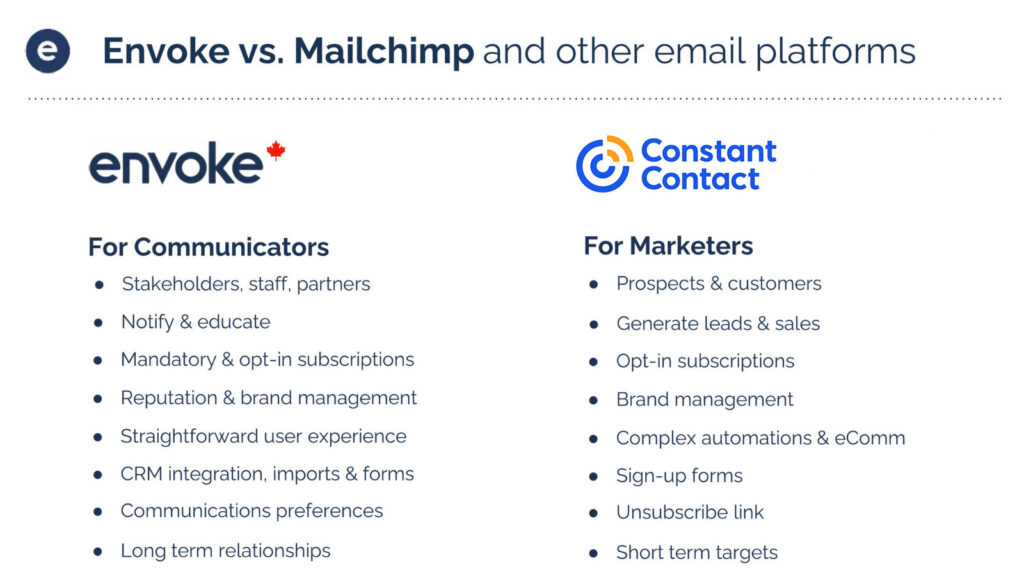
Constant Contact’s products focus on marketing, e-commerce, and lead generation for small business (SMB) marketers, and marketers with larger teams. Their purpose is commercial revenue generation. All features are designed with this in mind: with every setting the emphasis is to generate leads and sell to those leads using a combination of digital marketing automation tools. The contact lists of Constant Contact users are comprised of prospects, leads, and customers. The result is that Constant Contact can work well for marketers because the features are well-designed for this purpose and intuitive to use.
However, the mandate of communication professionals is not commercial revenue generation but stakeholder engagement via content that recipients want to receive and content they need to receive. The contact lists of communications professionals are comprised of stakeholders, members, staff, and registrants, and the objective is to inform, educate and foster long term relationships. Not to sell things.

2. Data Storage in Canada and CASL Compliance
As a Constant Contact alternative in Canada, Envoke stores all customer data on servers in Canada. This means your organization’s Canadian data storage requirement is satisfied when you have an account with Envoke.
Even if it’s not a hard requirement for your organization to keep data in Canada, it’s worth remembering that the US Patriot Act permits US law enforcement officials to seek a court order allowing them to access the personal records of any person without that person’s knowledge.
As for CASL compliance, Envoke is fully CASL compliant out of the box, supporting common use cases and even edge cases.
3. Subscription Management and Mandatory Content
Constant Contact and Envoke have similar list management tools to group contacts in order to send relevant emails. Both platforms have lists (subscriptions), tags, and segments (custom lists based on user-defined conditions) and both allow dynamic content in emails to show or hide blocks of content based on the recipient’s interest. In short, both platforms offer very flexible, powerful tools for managing contact lists.
When it comes to sending emails, Constant Contact only allows sending to lists (subscriptions) while Envoke allows sending an email to contacts that match certain tags or custom segments.
Envoke adds even more value with its customizable Unsubscribe Page and Mandatory Messages feature. Mandatory Messaging facilitates sending important messages in bulk to contacts regardless of their subscription status when regulation or contractual obligation requires you to do so. Let’s explore these two options a bit more closely.
The Unsubscribe Page
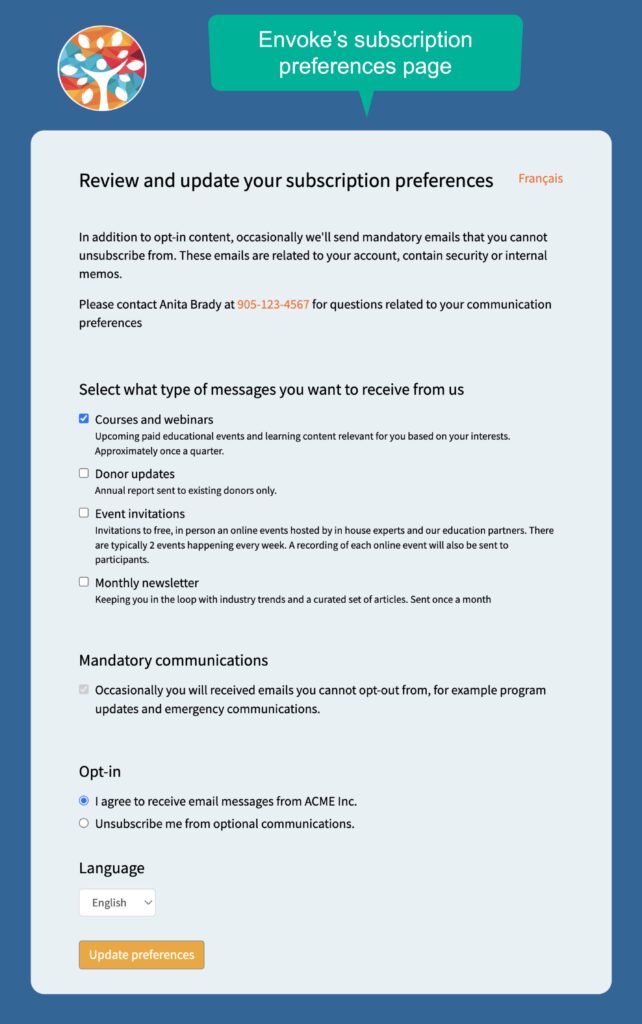
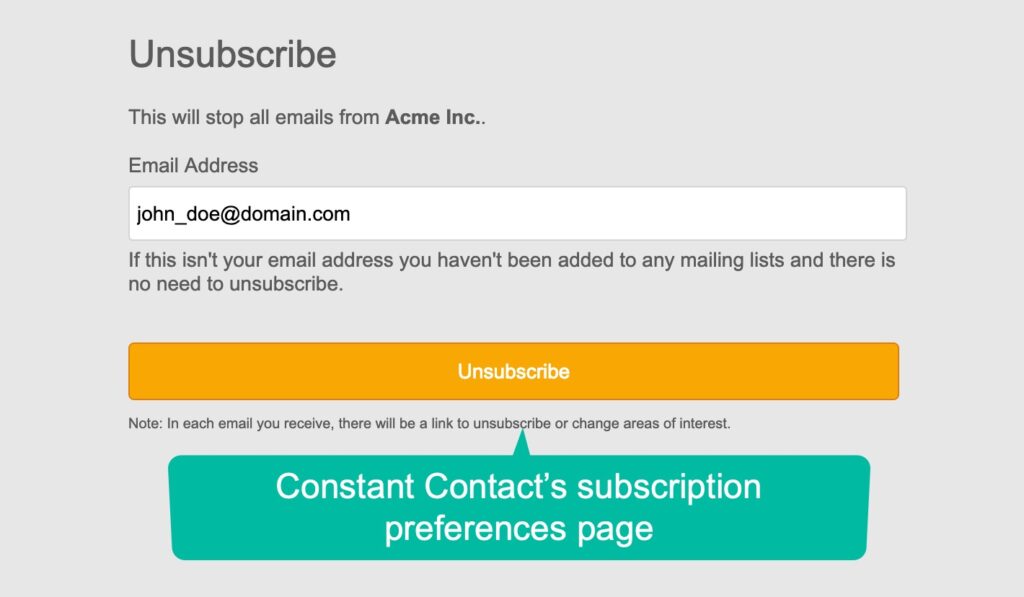
Envoke’s customizable Unsubscribe Page lets you empower your contacts to fully understand what type of messages they receive from you and why. Think of it as a relationship-building tool, not just a place to manage unsubscribed contacts. Communicators who embrace this concept will quickly see that Envoke is an excellent Constant Contact alternative for this reason alone. The page can be fully branded with your fonts, colours, domain name, custom text, and sections that can be added or removed.
Mandatory Messages that Contacts Must Receive
Reach even unsubscribed contacts with Envoke’s mandatory messages feature. Unique to Envoke, this feature lets you fulfill your legal or contractual obligation to deliver emails that your contacts can’t unsubscribe from. It is not offered by Constant Contact, Mailchimp, or any other email marketing platform, and is a vital tool for organisations with contractual or legal obligations to deliver messages from which stakeholders cannot unsubscribe.
Mandatory messaging saves considerable time and is much less error-prone than the manual work-arounds that many communicators are forced to invent in order to ensure mandatory messages are sent to those who must receive them.
Envoke Has All The Features You Need
Using a Constant Contact alternative in Canada doesn’t mean you’re compromising on core features. Every Envoke account includes all the essential features you are accustomed to:
Drag-and-drop email editing
Cost Comparison
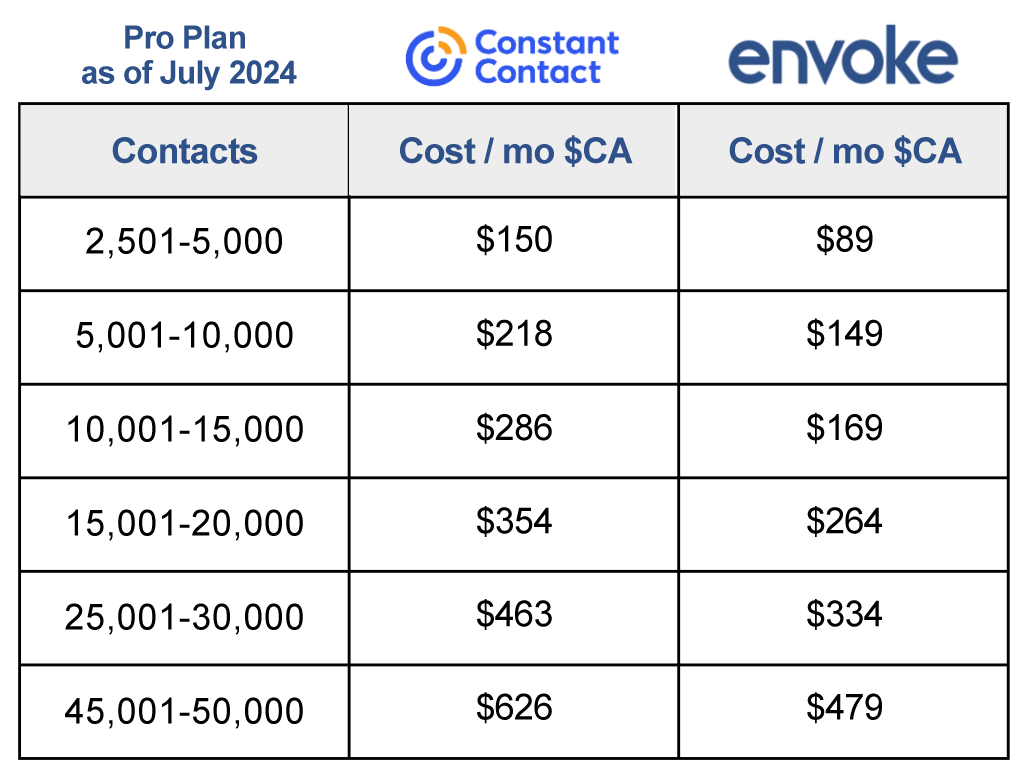
Because functionality varies it’s not possible to provide a direct comparison between Constant Contact and Envoke, but the same ie true when comparing any software. Still, the difference in pricing is significant, even when we account for the variouation in features offered in each billing plan. Take a look at Envoke’s detailed feature list and Constant Contact’s feature page, to see how features and price points stack up, specifically. This graph provides a good snapshot of the price comparison.
Who Uses Envoke?
Organizations of all sizes use Envoke as a Constant Contact alternative to engage stakeholders, including big and small associations, post-secondary institutions, muncipalities and government agencies. Whether you have one user, or one hundred, Envoke’s flexible pricing structure starts low and scales as your organization and contact list grows. (And unlike some of our competitors, you won’t pay to send email to unsubsribed contact with Envoke.) Envoke creates beautiful emails, enewsletters and e-blasts to inform and educate your takeholders, every time.
As for customer support, you get to interact with a human – and even speak with management if needed. From day one, our goal is to help customers be successful with their email communications and offer truly helpful support. Read reviews on Capterra.
Interested in a Canadian Alternative to Constant Contact?
You can book a live demo here to discuss your requirements and confirm or rule out a fit – or start a free trial to test drive functionality.